


Are you drowning in spreadsheets? Every hour your team spends manually processing invoices, consolidating financial reports, or chasing down data is an hour not spent on growing the business. This endless cycle of repetitive tasks is a silent tax on your resources, introducing human error and keeping you bogged down in operations instead of focusing on strategy. For SMBs and founders, the cost is significant: slow reporting, missed opportunities, and a reactive, rather than proactive, approach to decision-making.
This article moves beyond theory to provide concrete business process automation examples that deliver a real return on investment. We'll break down specific automation workflows for finance, operations, and HR that are directly applicable to small and medium-sized businesses. Forget the jargon; we’ll explain how to leverage tools like Power BI and modern data practices to build systems that scale with you, providing the visibility you need to align finance with operations and drive growth.
1. Invoice Processing Automation
Manual invoice processing is a notorious bottleneck for finance teams. It's plagued by data entry errors, lost documents, and slow approval cycles that strain vendor relationships and obscure your cash flow visibility. Invoice processing automation transforms this cumbersome task into a streamlined, touchless workflow. For SMBs, this is one of the most impactful business process automation examples because it directly tackles a high-volume, error-prone, and universal business function.
By leveraging technology like Optical Character Recognition (OCR) and automated workflows, the system ingests invoices (from email, PDFs, or scans), extracts key data like vendor name and line items, and validates it against your purchase orders. For growing businesses, this means faster payments, reduced labour costs, and more time for strategic financial planning instead of administrative fire-fighting.
The Automated Workflow in Action
The automation follows a clear, sequential path designed to eliminate manual touchpoints and accelerate the accounts payable cycle. This process flow visualizes the core stages, from initial data capture to final payment execution.
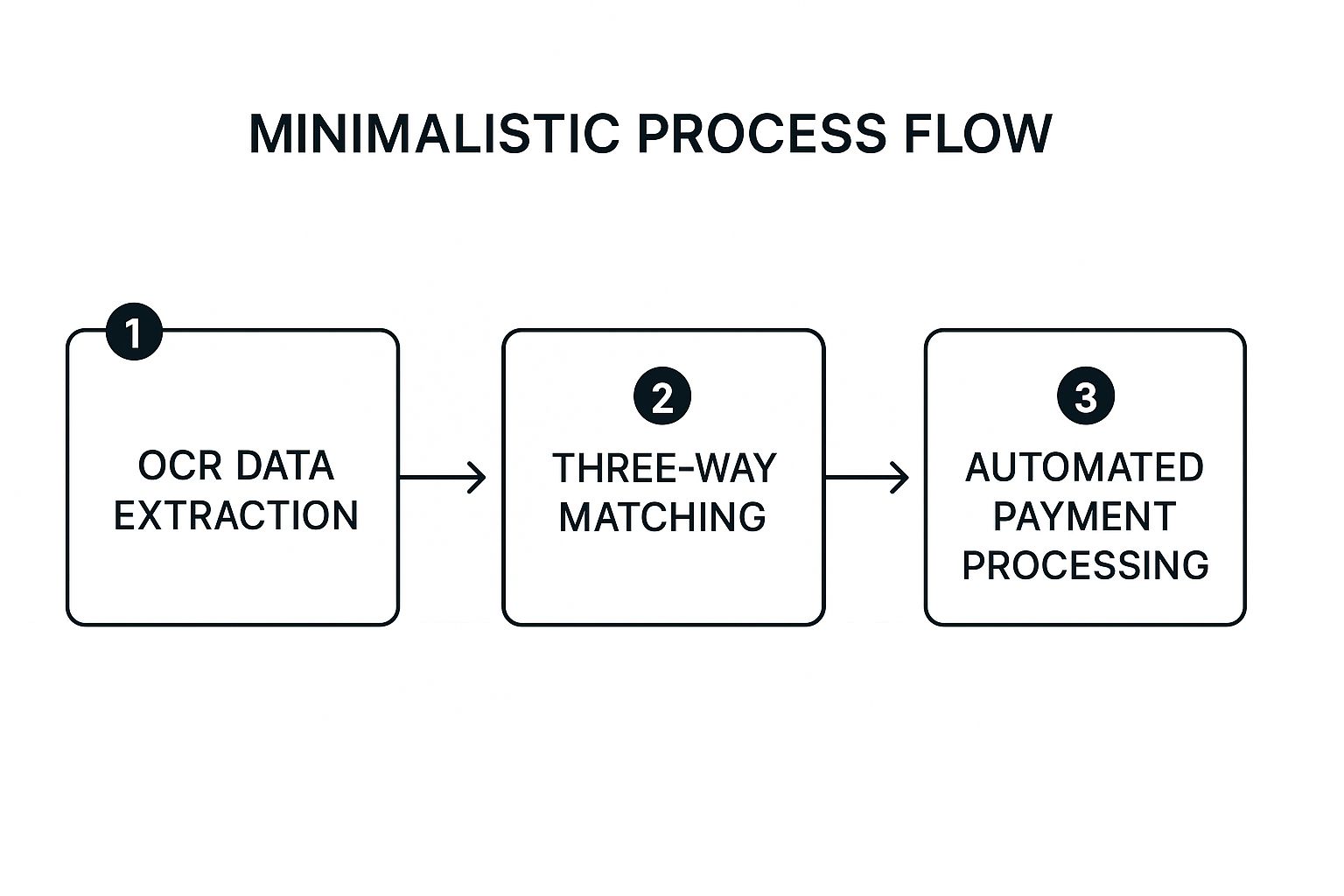
This three-step sequence forms the backbone of the automation, ensuring every invoice is validated, matched, and paid with minimal human oversight.
Actionable Takeaways
- Prioritize High-Volume Vendors: Start your automation journey by focusing on suppliers with standardized and frequent invoices to achieve quick wins and demonstrate value.
- Establish Digital Standards: Encourage vendors to submit invoices in standard digital formats like PDFs to improve data extraction accuracy and speed.
- Define Exception Handling: Create a clear process for handling exceptions, like mismatched amounts or missing PO numbers, to ensure flagged invoices are resolved quickly without halting the entire workflow.
2. Customer Onboarding Automation
A clunky, manual onboarding process creates friction, leading to high drop-off rates and a poor first impression. Customer onboarding automation eliminates these pain points by creating a seamless journey from initial sign-up to full service activation. As one of the most critical business process automation examples, it directly impacts revenue growth and customer retention by getting new clients to see value faster.
This automation uses a combination of digital forms, automated document collection, identity verification, and system integrations to set up new accounts without manual intervention. For your business, this means a faster time-to-revenue, improved customer satisfaction, and a scalable process that supports growth without needing to hire more people for administrative tasks.
The Automated Workflow in Action
The automation sequence guides new customers through a logical progression of steps, collecting necessary information and completing setup tasks without manual intervention. This workflow turns a complex, multi-step process into a smooth, self-service experience. It typically includes data capture, identity verification, account creation, and a welcome email sequence to drive initial engagement. This structured flow ensures consistency and speed, dramatically improving the new user experience.
Actionable Takeaways
- Map the Customer Journey: Before building any automation, thoroughly map every step of your ideal onboarding process to identify all required data points, documents, and system interactions.
- Implement Progressive Disclosure: For complex sign-ups, avoid overwhelming customers with a single long form. Instead, ask for information in smaller, logical chunks as they move through the process.
- Build in Human Escalation: Define clear triggers for when a case should be escalated to a human agent, such as a failed verification, ensuring complex issues are handled with a personal touch.
3. Employee Onboarding and HR Process Automation
Manual HR processes, especially employee onboarding, are often fragmented and bogged down by repetitive paperwork. This creates a disjointed experience for new hires and a compliance headache for the business. Automating these workflows transforms employee management from a reactive, administrative burden into a proactive, strategic function. This is a critical one of the business process automation examples because it directly impacts employee satisfaction, retention, and operational efficiency from day one.
Automation tools digitize everything from offer letters and background checks to IT equipment provisioning and policy sign-offs. This ensures a consistent, professional welcome for every new team member and frees up HR professionals to focus on culture and talent development instead of administrative tasks.
The Automated Workflow in Action
The automation replaces manual checklists with a triggered sequence of tasks, ensuring no step is missed from recruitment to full integration. This workflow provides a seamless, transparent experience for both the new employee and the internal teams involved, such as HR, IT, and finance.
- Trigger & Data Capture: A signed offer letter automatically initiates the onboarding workflow, pulling candidate data from your hiring system.
- Automated Provisioning: The system creates user accounts, orders equipment, and assigns necessary software licenses without manual IT intervention.
- Guided Onboarding & Compliance: New hires are guided through a digital portal to complete paperwork, review training materials, and e-sign documents, ensuring full compliance from the start.
This sequence guarantees that new hires have everything they need to be productive on their first day, creating a positive and lasting first impression.
Actionable Takeaways
- Start with High-Volume Processes: Focus initial automation efforts on routine, high-volume tasks like time-off requests or initial onboarding paperwork to deliver immediate value.
- Maintain the Human Touch: Automate the administrative steps but preserve human interaction for crucial, sensitive touchpoints like welcome meetings, performance reviews, and mentorship.
- Ensure Mobile Accessibility: Design workflows with mobile-friendly interfaces, especially for field or remote workers who need to complete HR tasks on the go.
4. Lead Generation and Sales Process Automation
Manually managing leads is a recipe for missed opportunities and inconsistent follow-ups. Sales process automation transforms this chaotic activity into a highly efficient, predictable engine for growth by systemizing lead capture, nurturing, and qualification. This is one of the most critical business process automation examples as it directly impacts revenue, freeing up your sales team to focus on closing deals rather than data entry.
By integrating your CRM with marketing platforms, you can automate email sequences, score leads based on their behaviour, and ensure every prospect receives timely, personalized communication. This allows your team to prioritize high-value leads and build a robust sales pipeline with minimal manual effort—a key advantage for scaling businesses. For a deeper dive into improving your sales funnel, exploring the role of data analysis in sales can reveal powerful insights.
The Automated Workflow in Action
The automated sales process guides a prospect from initial interest to sales-readiness through a series of intelligent, trigger-based actions. This flow ensures no lead falls through the cracks and that the sales team engages only with qualified opportunities. To specifically enhance your top-of-funnel activities, consider exploring further how to automating lead generation with proven strategies and AI tools to boost your sales pipeline.
- Lead Capture & Initial Nurturing: Leads from web forms or events are automatically added to the CRM and enrolled in a welcome email sequence.
- Behavior-Based Lead Scoring: The system tracks email opens, link clicks, and website visits, assigning points to each action to gauge interest and intent.
- Sales Handoff & CRM Update: Once a lead reaches a predefined score threshold, they are automatically assigned to a sales rep and their status is updated in the CRM, triggering a notification for immediate follow-up.
This sequence creates a seamless transition from marketing to sales, ensuring that engagement is both timely and relevant.
Actionable Takeaways
- Implement Dynamic Lead Scoring: Develop a scoring model based on both demographic fit (company size, industry) and behavioural data (pages viewed, content downloaded) to accurately identify sales-ready leads.
- Segment Your Audience: Create distinct nurturing paths for different customer segments. A prospect from a large enterprise should receive different content than one from a small startup.
- Use Trigger-Based Workflows: Set up automations that trigger specific actions based on prospect behaviour, such as sending a case study after they visit your pricing page.
5. Inventory Management Automation
For any business holding physical goods, manual inventory tracking is a high-stakes guessing game that often leads to costly stockouts or excess capital tied up in slow-moving items. Inventory management automation replaces guesswork with data-driven precision, providing a real-time, accurate view of stock levels. This is a critical one of the business process automation examples for retail and manufacturing, as it directly impacts cash flow, customer satisfaction, and operational efficiency.
By integrating your warehouse management system (WMS) with sales and purchasing data, automation can trigger reorder points, optimize stock placement, and even forecast demand to prevent stockouts. This level of control empowers businesses to minimize tied-up capital and respond instantly to market changes.
The Automated Workflow in Action
The automation transforms inventory control from a reactive, manual count into a proactive, self-regulating system. This workflow highlights how technology monitors, analyzes, and replenishes stock with minimal human intervention, ensuring optimal levels are maintained across the supply chain. For manufacturers, understanding these dynamics is key; you can discover more about manufacturing analytics to see how data transforms operations.
This continuous loop of tracking, alerting, and reordering ensures that inventory aligns perfectly with sales velocity and supply chain realities.
Actionable Takeaways
- Implement ABC Analysis: Categorize your inventory into A (high-value, low-quantity), B (moderate), and C (low-value, high-quantity) items. Focus your initial automation efforts on the 'A' items where accuracy provides the greatest financial impact.
- Establish Automated Alerts: Set up rules in your WMS or ERP to automatically trigger alerts for low stock levels, slow-moving items, or potential stockouts, enabling proactive decision-making.
- Regularly Tune Reorder Parameters: Your reorder points and safety stock levels are not static. Use historical sales data and forecasts to regularly review and adjust these parameters to reflect seasonality and changing demand.
6. Customer Support Ticketing Automation
Managing customer inquiries manually is a resource-draining challenge, often leading to slow response times, inconsistent answers, and overwhelmed support teams. Customer support ticketing automation addresses this by using AI chatbots and intelligent workflows to manage, categorize, and resolve customer issues efficiently. This is one of the most critical business process automation examples for service-oriented businesses, as it directly improves customer satisfaction and operational scalability.
By using automated routing, systems can handle initial inquiries, instantly answer common questions with a knowledge base, and route complex cases to the right human agent. For SMBs, this means providing 24/7 support, reducing agent workload, and freeing up the team to focus on high-value customer interactions instead of repetitive queries.
The Automated Workflow in Action
This automation follows a logical sequence to triage and resolve customer needs with speed and precision, ensuring a seamless experience from initial contact to final resolution. The workflow is designed to deflect common tickets and intelligently escalate when human expertise is required.
This three-step process creates a highly efficient front line, ensuring customers get fast answers while complex issues receive the attention they deserve.
Actionable Takeaways
- Start with High-Frequency Inquiries: Analyze your support tickets to identify the top 5-10 most common questions and build automated responses for them first.
- Ensure a Clear Escalation Path: Always provide an easy and obvious option for customers to connect with a human agent if the automated system cannot resolve their issue.
- Continuously Update Your Knowledge Base: Regularly review chatbot conversations and failed queries to identify gaps in your help documentation and update it accordingly to improve the automation's effectiveness.
7. Expense Report Processing Automation
Manual expense reporting is a significant drain on productivity, characterized by lost receipts, out-of-policy spending, and lengthy reimbursement cycles. Expense report processing automation converts this frustrating, paper-based chore into a seamless, mobile-first experience. As one of the most relatable business process automation examples, it directly enhances employee satisfaction while giving finance leaders real-time control over spending.
By leveraging mobile apps with OCR and automated policy engines, employees can snap a photo of a receipt, and the system automatically digitizes the data, categorizes the expense, and checks it against company policies. For SMBs, it means eliminating manual data entry, enforcing spending policies consistently, and drastically shortening reimbursement times, improving morale and operational efficiency.
The Automated Workflow in Action
The automation transforms expense submission from a multi-step manual task into a simple, three-stage digital process. This workflow highlights the key phases, from instant data capture via a mobile app to direct integration with accounting software for final payment.
- Capture & Digitize: Employees use a mobile app to photograph receipts. OCR technology instantly extracts key data like vendor, date, and amount, auto-populating an expense line item.
- Validate & Approve: The system automatically checks the submitted expense against predefined spending policies. In-policy claims are routed to managers for one-click approval, while exceptions are flagged for review.
- Process & Reimburse: Once approved, the expense data is seamlessly synchronized with your accounting system, and reimbursement is automatically processed via payroll or direct deposit.
This sequence removes administrative friction for employees and provides the finance department with accurate, policy-compliant data without manual intervention.
Actionable Takeaways
- Pilot with Frequent Travelers: Roll out the new system to a small group of your most frequent travelers first to gather feedback and refine the process before a company-wide launch.
- Prioritize Mobile App Training: Ensure all employees receive clear, concise training on how to use the mobile app, as high user adoption is critical to maximizing ROI.
- Embed Clear Policy Rules: Program your specific spending policies directly into the automation platform to create hard-wired compliance checks and reduce manual oversight.
8. Order Processing and Fulfillment Automation
Manual order management is a significant drag on e-commerce and retail operations, leading to shipping delays, inventory discrepancies, and poor customer experiences. Automating order processing and fulfillment tackles these challenges head-on by creating a seamless flow from the moment a customer clicks "buy" to when the package arrives. This is one of the most critical business process automation examples for any company selling physical goods, as it directly impacts revenue, customer satisfaction, and scalability.
By integrating e-commerce platforms, inventory systems, and shipping carriers, automation orchestrates the entire order-to-cash cycle. The system captures orders, allocates stock in real-time, optimizes picking routes in the warehouse, and selects the best shipping option automatically. Achieving success in e-commerce often hinges on effective Order Fulfillment Automation, which allows businesses of all sizes to compete by delivering speed and accuracy.
The Automated Workflow in Action
The automation follows a logical sequence that removes manual bottlenecks and minimizes the risk of human error. This workflow illustrates the journey of an order from initial capture through to final customer notification, ensuring a smooth and efficient fulfillment process.
This four-step sequence is the engine of a modern fulfillment operation, enabling businesses to meet customer expectations for fast and reliable delivery with minimal manual intervention.
Actionable Takeaways
- Implement Real-Time Inventory Sync: Connect your sales channels directly to your inventory management system to prevent overselling and automatically update stock levels.
- Automate Carrier Selection: Set up rules based on package weight, destination, and delivery speed to automatically choose the most cost-effective shipping carrier for every order.
- Establish Exception Workflows: Create automated alerts for issues like incorrect addresses or out-of-stock items, routing them to the right team for immediate resolution.
9. Financial Reporting and Compliance Automation
Manual financial reporting is a high-stakes, time-intensive process that leaves little room for error but is often riddled with it. The month-end close and management reporting can stretch finance teams thin, turning strategic professionals into data entry clerks. Financial reporting automation addresses this pain point by creating a systematic, auditable, and highly efficient workflow for generating critical financial documents.
By integrating disparate data sources, such as your ERP, CRM, and accounting software, this automation builds a single source of truth for your financial data. It automates data collection, reconciliation, and variance analysis, drastically reducing the risk of human error. For SMBs, this translates into faster insights into performance, enhanced accuracy, and the ability to reallocate finance expertise toward strategic forecasting and modelling. This is a critical one of the business process automation examples for any founder who wants to finally trust their numbers.
The Automated Workflow in Action
The automation follows a structured sequence that transforms raw transactional data into polished, insightful financial reports. This workflow minimizes manual intervention, enforces consistency, and builds a complete audit trail for every number generated.
- Data Consolidation: The system automatically pulls financial data from all relevant sources—like your accounting ledger, sales platform, and operational systems—into a centralized data model.
- Automated Reconciliation and Validation: Rules-based engines automatically reconcile accounts, flag discrepancies, and validate data against predefined controls and accounting standards.
- Report Generation and Distribution: Once validated, the system generates standardized financial statements, KPI dashboards, and management reports, then distributes them to stakeholders on a predefined schedule.
This systematic approach ensures that reporting is not just faster but also more reliable and transparent.
Actionable Takeaways
- Start with Routine Reports: Begin by automating high-volume, rules-based reports like standard income statements or cash flow summaries to demonstrate value quickly.
- Implement Robust Data Validation: Create and enforce strict data validation controls at the source and during consolidation to ensure the integrity of your financial data. You can explore how business intelligence for finance can support this process.
- Maintain Detailed Audit Trails: Ensure your automation platform logs every action, calculation, and data transformation to provide a clear and defensible audit trail for internal and external reviewers.
Business Process Automation: 9 Examples Comparison
| Automation Type | Implementation Complexity 🔄 | Resource Requirements 💡 | Expected Outcomes ⭐📊 | Ideal Use Cases 💡 | Key Advantages ⚡ |
|---|---|---|---|---|---|
| Invoice Processing Automation | High initial setup; complex exception handling | Requires clean master data; ERP integration | Reduces processing time by up to 50%; cost cut by 80% | High-volume standard invoices; finance departments | Eliminates errors; improves cash flow visibility |
| Customer Onboarding Automation | Complex integration; regulatory compliance | Multiple system integrations; compliance checks | Cuts onboarding from weeks to days; boosts satisfaction | Financial services, SaaS, telecom, insurance | 24/7 onboarding; improves compliance |
| Employee Onboarding & HR Automation | Moderate to high; integration with payroll | HR systems integration; change management | Reduces admin burden; improves engagement and audit trails | Recruitment, onboarding, employee management | Scales with growth; consistent policy enforcement |
| Lead Generation & Sales Automation | Moderate complexity; ongoing optimization needed | CRM integration; content creation resources | Increases lead conversion by 20-30%; shortens sales cycle | Sales teams, marketing departments | Consistent follow-up; improves forecasting |
| Inventory Management Automation | High complexity; multi-system integration | Technology investment (RFID, sensors); supplier integration | Reduces inventory costs by 20-30%; prevents stockouts | Warehousing, retail, manufacturing | Real-time inventory; demand forecasting |
| Customer Support Ticketing Automation | Moderate; continuous AI training needed | AI chatbot tech; multi-channel support setup | 24/7 support; reduces response time significantly | Customer service centers | Handles high volume; improves satisfaction |
| Expense Report Processing Automation | Moderate; policy configuration needed | Mobile app adoption; accounting system integration | Cuts processing time by 75%; reduces admin costs | Corporate travel, finance teams | Real-time visibility; error reduction |
| Order Processing & Fulfillment Automation | High; multi-location and carrier integrations | E-commerce platforms; WMS and carrier API integration | Speeds order fulfillment; reduces shipping errors | Retail, e-commerce, logistics | Scales during peak times; optimizes shipping costs |
| Financial Reporting & Compliance Automation | High complexity; needs multi-entity support | Extensive system integration; high data quality | Cuts close time by 50-70%; improves accuracy and compliance | Finance departments; multi-entity corporations | Real-time dashboards; regulatory risk reduction |
From Automation to Insight: Your Next Step
We've explored a diverse landscape of business process automation examples, moving from streamlining invoice processing to optimising financial reporting. The core lesson is clear: for an SMB owner or operator, automation is not just about doing things faster. It’s about creating the space and data you need to make smarter, more strategic decisions.
Each example shares a common thread. The initial goal might be to eliminate repetitive tasks, but the ultimate prize is the high-quality, structured data that automation produces. This data is the raw material for genuine business intelligence, transforming your operations from a series of disconnected spreadsheets into an integrated, insight-generating ecosystem. You stop reacting to yesterday's problems and start proactively shaping tomorrow's outcomes.
Your Strategic Takeaways and Next Actions
The journey from manual chaos to automated clarity is a structured one. Reflecting on the business process automation examples we've detailed, several key actions emerge as crucial first steps for any founder or operator ready to make a change.
Key Insights to Internalise:
- Start with High-Pain, High-Volume Processes: Don't try to boil the ocean. Identify the processes that cause the most headaches and consume the most manual hours, like compiling your monthly financial reports. These are prime candidates for automation and will deliver the quickest, most visible ROI.
- Automation Feeds Analytics: Remember that the goal extends beyond efficiency. A well-automated process, like order fulfillment or customer onboarding, systematically captures critical data. This clean, consistent data is the foundation upon which powerful Power BI dashboards and predictive financial models are built.
- Standardisation is a Prerequisite: You cannot automate a chaotic process. Before implementing any tool, the first step is always to map, simplify, and standardize the existing workflow. This discipline forces operational clarity and is often where the most significant initial gains are found.
Strategic Point: The most successful automation initiatives view technology not as a replacement for people, but as a tool to augment their capabilities. By handling the repetitive, rule-based tasks, automation frees your team to focus on analysis, strategy, and innovation—the high-value work that truly drives growth.
Moving forward, your mission is to see these concepts as a cohesive strategy. Begin by auditing your own business operations. Where are the bottlenecks? Where does "Excel chaos" reign supreme? Choose one area, apply the principles we've discussed, and build momentum from that initial success. The path to a data-driven organisation is paved with these deliberate, well-executed steps.
Ready to automate your reporting and finally trust your data? The examples covered here are just the beginning. At Vizule, we specialise in helping SMBs and founders connect the dots in their data, designing the exact automated reporting and Power BI dashboards that turn raw numbers into strategic insight. If you're tired of manual reports and want to build a truly data-driven business, book a free BI consultation with us today and let's map out your automation journey.
