


For small and medium-sized business owners, the move from scattered spreadsheets to a unified data system like Power BI is a game-changer. But the process of getting your data from point A to point B, known as data migration, can feel daunting. One wrong move and you risk corrupted data, costly downtime, and reports you simply can't trust. The good news? A successful, stress-free migration is entirely achievable with the right strategy.
This guide outlines the essential data migration best practices that we, at Vizule, use to help founders and operators like you navigate this critical transition. We will provide a clear, actionable roadmap to move your business from fragmented data silos to a centralised, automated analytics platform. Forget generic advice; we are focusing on the specific, practical steps that prevent common pitfalls and ensure your project delivers immediate value.
You will learn how to:
- Assess and profile your existing data to uncover hidden issues before they become major problems.
- Build a detailed plan that accounts for timelines, resources, and potential risks.
- Validate and test your data rigorously to guarantee accuracy in your new system.
- Manage the transition with minimal disruption to your daily operations.
We will break down 8 key steps, from initial assessment to post-migration validation, ensuring your new business intelligence system is built on a foundation of clean, reliable data from day one. Say goodbye to Excel chaos and hello to insight-led decision-making.
1. Comprehensive Data Profiling and Assessment
Embarking on a data migration without first understanding your data is like setting sail without a map. Comprehensive data profiling and assessment is the critical first step in charting your course. This process involves a deep, analytical review of your source data to understand its structure, quality, completeness, and inter-relationships before you move a single byte. It's about getting under the hood to see what you're really working with.
This isn't just a technical exercise; it's a foundational element of any successful data migration best practices. By examining data patterns, value distributions, and metadata, you can proactively identify anomalies, duplicates, and inconsistencies that would otherwise derail your project or corrupt your new system with bad data. Think of it as a pre-migration health check for your most valuable asset.

Why Profiling is Non-Negotiable
Failing to profile data is a direct path to budget overruns, extended timelines, and a destination system that no one trusts. The "garbage in, garbage out" principle applies with full force. Profiling provides a clear baseline, helping you scope the project accurately, define realistic transformation rules, and prevent compliance nightmares by uncovering sensitive data in unexpected places.
A financial services firm, for example, discovered critical Personally Identifiable Information (PII) hidden in free-text "notes" fields during a pre-migration assessment. This discovery allowed them to properly secure the data, preventing a potentially catastrophic compliance violation and fine. For SMBs, this step is crucial for building a reliable data foundation for future growth and analytics in tools like Power BI.
Key Insight: Data profiling transforms the unknown into the known, shifting your migration strategy from reactive problem-solving to proactive, planned execution. It's the difference between navigating a migration with a clear map versus flying blind.
Actionable Tips for Effective Data Profiling
To integrate this practice effectively, follow a structured approach:
- Start Early: Begin profiling during the project's planning phase, not as an afterthought. The insights gained will directly influence your project scope, tool selection, and timeline.
- Leverage Automation: Manual profiling is impossible at scale. Utilise automated tools like Talend Data Quality, Informatica Data Quality, or cloud-native services like AWS Glue DataBrew to accelerate the process and uncover hidden patterns.
- Prioritise Critical Data: Begin with the data most critical to business operations, such as customer, product, and financial records. This ensures your most valuable information is clean and ready for migration first.
- Document Everything: Create a comprehensive data inventory that documents all findings, including data types, null values, frequency counts, and identified quality issues. This document becomes a vital reference for the entire project team.
- Involve Business Stakeholders: Share your findings with the business users who understand the data's context. They can validate anomalies (e.g., is a sudden sales spike a data error or a successful promotion?) and help prioritise what needs fixing.
2. Develop and Maintain a Detailed Migration Plan
Attempting a data migration without a detailed plan is akin to constructing a building without a blueprint. A comprehensive migration plan is the strategic roadmap for the entire project, meticulously documenting scope, timelines, responsibilities, dependencies, and risk mitigation strategies. This is where you translate your high-level goals into an executable sequence of actions.
This plan is not a static document; it's a living guide that evolves throughout the project. It ensures that technical teams, business stakeholders, and project managers are all aligned and working from the same script. This process transforms a potentially chaotic endeavor into a controlled, predictable, and successful migration, which is a cornerstone of data migration best practices.
Why a Plan is Your Project's Blueprint
Failing to create a detailed plan is a common reason why migrations fail, leading to critical missteps, missed deadlines, and severe business disruption. The plan forces you to think through every phase, from data mapping and transformation logic to validation criteria and rollback procedures. It's the ultimate tool for managing complexity and ensuring accountability.
For instance, Netflix's monumental seven-year cloud migration involved moving billions of customer records with zero major outages, a feat made possible by an exceptionally detailed and phased plan. For an SMB, a well-structured plan ensures that the migration of financial or customer data into a new system like Power BI doesn't disrupt daily operations or compromise data integrity, which is crucial for reliable reporting.
Key Insight: A detailed migration plan turns ambiguity into clarity. It provides a single source of truth that aligns every stakeholder, defines success, and provides a clear path to navigate the inevitable challenges of any migration project.
Actionable Tips for Effective Migration Planning
To build a plan that guarantees success, integrate these steps into your process:
- Start Broad, Then Go Deep: Begin with a high-level strategy outlining key phases and milestones. Progressively elaborate on the details for each phase, creating detailed runbooks and task lists for the execution teams.
- Schedule for Minimal Impact: Plan the final cutover during periods of low business activity, such as weekends or evenings, to minimise disruption to operations and customer experience.
- Define Success Explicitly: Document clear, measurable success criteria and acceptance thresholds before you begin. What does a "successful" migration look like for your business?
- Include a Contingency Buffer: Even the best plans encounter unexpected issues. Incorporate a time buffer, typically 20-30% of the project timeline, to handle unforeseen problems without derailing the entire project.
- Plan and Perform Dry Runs: Conduct multiple full dry runs or mock migrations in a pre-production environment. This helps identify process gaps, validate your runbook, and build the team's confidence before the final go-live event. You can learn more by exploring how to build a comprehensive cloud migration plan on Vizule.io.
3. Implement Robust Data Validation and Reconciliation
If data profiling is the map, then robust data validation and reconciliation are your navigation instruments, confirming you are precisely on course. This practice is the systematic process of checking migrated data for integrity, accuracy, and completeness by comparing the source and target systems. It’s about verifying that what you planned to move arrived intact, without corruption, loss, or unintended transformation.
This is more than just a final quality check; it is an ongoing assurance mechanism embedded throughout the migration lifecycle. By comparing row counts, checksums, and business-level aggregates, you create a chain of evidence that proves the migration's fidelity. This is a non-negotiable step in any data migration best practices framework, ensuring the new system can be trusted from day one.
Why Validation is Business-Critical
Skipping rigorous validation is a high-stakes gamble with your business operations. A migration can appear successful on the surface, but silent data corruption or loss can lead to flawed financial reports, incorrect operational decisions, and a complete erosion of user trust. Reconciliation acts as your safety net, catching discrepancies before they impact the business.
For instance, an e-commerce company migrating its order history nearly faced a $2.3 million accounting discrepancy. Their multi-layered validation process, which reconciled total revenue figures between the old and new systems, caught the error before it impacted financial statements. For SMBs moving to Power BI, this level of validation ensures that your new dashboards and forecasts are built on a foundation of absolute truth.
Key Insight: Data validation is not about finding errors; it's about proving their absence. It provides the empirical evidence needed for business leaders to confidently sign off on the migration and decommission the old system.
Actionable Tips for Effective Validation
To build a validation process that guarantees data integrity, follow these steps:
- Implement Multi-Stage Checks: Don't wait until the end. Perform validation at multiple points: a pre-migration baseline, during the transfer (for real-time migrations), and a comprehensive post-migration verification.
- Start Broad, Then Go Deep: Begin with aggregate checks like row counts and column sums for a quick, high-level comparison. Follow this with more granular, record-level comparisons on critical data segments.
- Automate Everything Possible: Manual validation is slow, error-prone, and impractical for large datasets. Use ETL tools, SQL queries, or custom scripts to automate the comparison process and generate exception reports.
- Define Acceptable Variances: In some cases, minor discrepancies might be expected. Work with business stakeholders to define acceptable thresholds for variance before the migration begins.
- Validate Data and Metadata: Check not only the data values themselves but also the metadata. Ensure that critical relationships, constraints, and data types have been correctly replicated in the target system.
4. Perform Multiple Test Migrations and Dry Runs
Would you launch a rocket to space without a single simulation? Of course not. Treating your data migration with the same gravity is essential. Performing multiple test migrations and dry runs is the practice of repeatedly executing the entire migration process in a non-production environment. This isn't just a simple test; it's a full dress rehearsal designed to uncover flaws, refine timing, and build team confidence before the final go-live event.
This rigorous testing phase moves your migration plan from theory to proven practice. By using production-like data and simulating real-world conditions, you can identify performance bottlenecks, data transformation errors, and procedural gaps. Each dry run serves as an opportunity to iterate and improve, turning your team into a well-oiled machine ready for any contingency. This is a cornerstone of effective data migration best practices, ensuring predictability and minimizing business disruption.
Why Rehearsal is Mandatory
Skipping comprehensive dry runs is an invitation for disaster on migration day. Issues that seem minor in planning can escalate into hours or even days of downtime. A single undiscovered encoding issue, for example, could corrupt thousands of critical records. For SMBs relying on accurate data for tools like Power BI, this could render financial forecasts and operational dashboards completely useless.
Consider a university that discovered critical data encoding issues during its second test migration. This early detection prevented the corruption of over 40,000 student transcripts in the live system. Similarly, a financial institution identified a severe network bottleneck during a dry run that would have halted its trading platform, saving it from significant financial and reputational damage. These rehearsals turn potential catastrophes into manageable, pre-solved problems.
Key Insight: A test migration isn't about seeing if it works; it's about finding every reason it might fail. Each failed dry run is a success because it uncovers a weakness that can be fixed before it impacts your business.
Actionable Tips for Effective Dry Runs
To make your test migrations count, integrate them strategically into your project plan:
- Plan for at Least Three Runs: Schedule a minimum of three full dry runs. The first often reveals major issues, the second refines the process, and the third validates the fixes and confirms readiness.
- Use Realistic Data: Work with a recent, full-scale snapshot of your production data. Ensure any Personally Identifiable Information (PII) is properly anonymized or masked to maintain compliance while testing.
- Simulate Production Conditions: Conduct tests during a similar time window as your planned go-live (e.g., a weekend or overnight) to accurately gauge performance and identify potential conflicts with other system processes.
- Test Your Rollback Plan: The ability to revert is just as important as the ability to move forward. Deliberately test your rollback procedures to ensure you have a viable exit strategy if the live migration fails.
- Document and Time Everything: Record the actual time taken for each step of the process. Compare this against your estimates to build a precise, reliable go-live runbook that the entire team can follow.
- Involve All Stakeholders: Migration day involves more than just the technical team. Include business users and stakeholders in the validation phase of your dry runs to confirm data integrity and functionality from their perspective.
5. Establish Clear Data Governance and Security Protocols
Migrating data without robust governance and security is like moving into a new high-tech office but leaving all the doors and windows unlocked. You risk exposing your most sensitive assets to internal and external threats. Establishing clear data governance and security protocols is the practice of wrapping your entire migration project in a protective layer of rules, access controls, and compliance checks. It ensures that from source to destination, your data remains confidential, integral, and available only to authorised personnel.
This is a non-negotiable step in modern data migration best practices, particularly with the rise of stringent regulations like GDPR and HIPAA. It involves classifying data, defining who can access what, encrypting information in transit and at rest, and creating an auditable trail of every action taken. It's about building a framework of trust and accountability that protects your business, your customers, and your reputation.
Why Governance is Your Data's Bodyguard
Overlooking governance and security can lead to catastrophic consequences: data breaches, hefty regulatory fines, and a complete loss of customer trust. Proper protocols are not a barrier to progress; they are enablers of a secure, compliant, and successful migration. By defining these rules upfront, you ensure the project adheres to legal standards and that the new system inherits a strong security posture from day one.
Consider a healthcare provider that, during a migration to a new cloud platform, implemented field-level encryption for all 10 million of its patient records. This proactive measure not only protected the data during the move but also ensured continuous HIPAA compliance in the new environment, preventing potential breaches and violations that could have crippled the organisation. For any SMB, strong governance builds the secure foundation needed for reliable business intelligence.
Key Insight: Data governance and security aren't just IT concerns; they are fundamental business requirements. Integrating them into your migration plan transforms risk management from a reactive afterthought into a proactive, strategic advantage.
Actionable Tips for Secure and Compliant Migration
To embed robust governance and security into your migration, adopt a structured, security-first mindset:
- Classify Data Early: Before the migration begins, classify all data based on sensitivity (e.g., Public, Internal, Confidential, PII). This dictates the level of security required for each data set.
- Implement Least Privilege Access: Grant migration team members access only to the data and systems absolutely necessary for their roles. This minimises the risk of accidental exposure or unauthorised modifications.
- Encrypt Everything: Use strong encryption for data both in transit (using protocols like SFTP or VPN) and at rest in the source and target systems. Consider using separate encryption keys for different data classifications.
- Anonymise Test Data: When populating test and development environments, use masked, tokenised, or anonymised production data. This allows for realistic testing without exposing sensitive information.
- Maintain Comprehensive Audit Logs: Enable and monitor detailed logging for all data access, modifications, and system activities throughout the migration. A critical component of this involves understanding current data security best practices.
- Plan for Secure Disposal: Create a formal plan for securely decommissioning and wiping data from the source systems once the migration is successfully verified and completed. If you want to dive deeper, you can learn more about data governance best practices on vizule.io.
6. Design for Minimal Downtime with Phased or Zero-Downtime Approaches
For any business, especially an SMB where every transaction counts, system downtime isn't just an inconvenience; it's lost revenue and a hit to customer trust. Designing your data migration to minimize or eliminate this disruption is a critical best practice. This means moving beyond a simple "switch-off, switch-on" plan and adopting a strategy that keeps the lights on while the complex work happens behind the scenes.
This approach involves selecting a migration method based on your specific business requirements, data complexity, and tolerance for service interruption. Whether it's a carefully sequenced phased migration, a parallel run, or a zero-downtime approach using real-time data replication, the goal is to make the transition invisible to your end-users. It's about performing open-heart surgery on your data systems without the patient ever knowing.
The following decision tree helps visualize how to select the right migration strategy based on your unique constraints and goals.
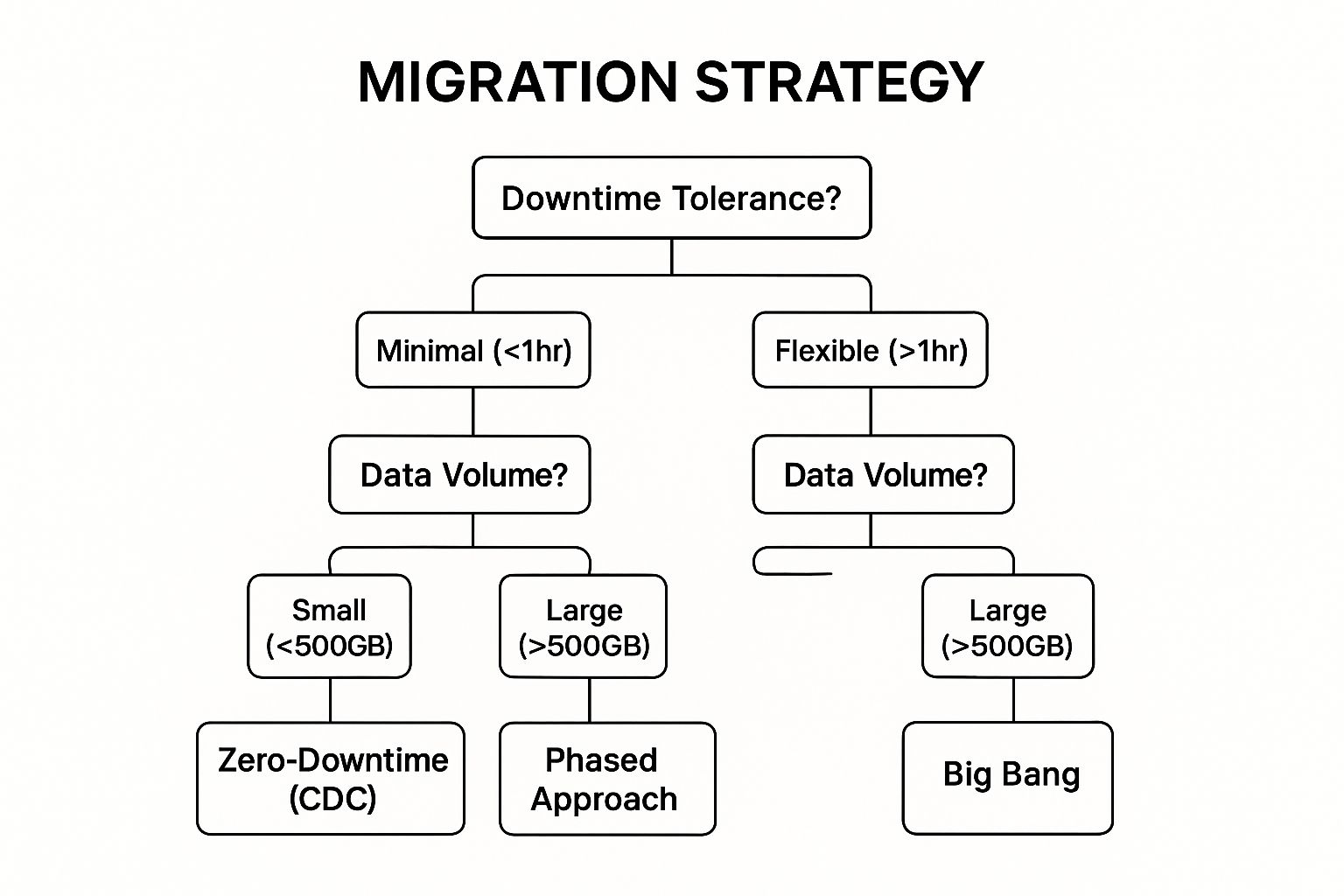
As the visualization shows, your tolerance for downtime and the volume of data are the primary drivers in deciding between a Big Bang, Phased, or Zero-Downtime migration.
Why Downtime Strategy is Critical
A poorly planned cutover can directly impact your bottom line, damage your reputation, and cause internal chaos. An e-commerce platform that goes offline during a peak sales period loses more than just transactions; it loses customer loyalty. Conversely, a well-executed, low-downtime migration builds confidence in the new system and maintains business continuity, which is essential for SMBs focused on growth and operational stability.
For instance, a major airline migrated its massive reservation system by using a phased approach, region by region. This limited the potential impact to only a small fraction of customers at any given time, preventing global disruption. For an SMB, this could mean migrating department by department or one product line at a time, ensuring core operations are never fully compromised.
Key Insight: The success of a data migration isn't just measured by the data's integrity in the new system, but also by the business's ability to operate uninterrupted throughout the process. Minimal downtime is not a luxury; it's a core project requirement.
Actionable Tips for a Seamless Cutover
To architect a migration with minimal business disruption, consider these strategies:
- Choose Based on Business Impact: Your downtime tolerance should dictate your strategy. Is an hour of downtime acceptable overnight, or do you need 100% uptime? This decision is the foundation of your plan.
- Leverage Change Data Capture (CDC): For large, active databases, use CDC tools to replicate data changes from the source to the target system in real-time. This keeps both systems synchronized until you're ready to make the final cutover.
- Plan a Phased Rollout: Migrate your data or users in logical, manageable chunks. You could segment by business unit, geographical region, or even by starting with the least critical systems to build momentum and confidence.
- Implement a Parallel Run: For a period, run both the old and new systems simultaneously. This allows for direct comparison and validation, ensuring the new system performs as expected before you decommission the old one.
- Create a Detailed Cutover Checklist: Document every single step, dependency, and responsible person for the final migration event. This plan should include precise timing, rollback procedures, and communication protocols.
7. Create Comprehensive Rollback and Contingency Plans
Even the most meticulously planned data migration can face unexpected turbulence. A comprehensive rollback and contingency plan is your project's essential safety net. It is a pre-defined, tested strategy to revert to the source system if the migration encounters unacceptable errors, performance issues, or data integrity failures. This isn't about planning to fail; it's about preparing to succeed by mitigating the risks of failure.
This practice involves more than just having backups. It's a detailed playbook outlining the specific triggers for a rollback, the technical procedures for restoring data and configurations, and the communication protocols to manage the process with minimal business disruption. Implementing this as one of your core data migration best practices provides a crucial layer of security and gives stakeholders the confidence to proceed with the go-live decision.
Why a Rollback Plan is Your Ultimate Insurance Policy
Proceeding without a rollback plan is a high-stakes gamble. When a critical issue arises mid-migration, panic and indecision can lead to a chaotic response, extending downtime and potentially causing irreversible data corruption. A clear plan removes ambiguity, enabling a swift, controlled retreat to a stable state, thereby protecting business operations and preserving data integrity.
Consider a healthcare provider that, four hours into a migration, detected critical data integrity issues that could impact patient records. Their pre-defined rollback plan allowed them to restore the original system within an hour, preventing potential patient safety crises. For an SMB, this could be the difference between a controlled delay and a business-halting disaster that erodes customer trust and impacts revenue.
Key Insight: A well-tested rollback plan transforms a potential migration catastrophe into a manageable incident. It's the ultimate insurance policy that you hope you never need, but are profoundly grateful for when you do.
Actionable Tips for Effective Rollback Planning
To build a robust safety net for your migration, integrate these steps:
- Define Clear Triggers: Before the migration begins, establish specific, measurable criteria for initiating a rollback. This could include data validation error rates exceeding 2%, critical business process failure, or transaction times surpassing a defined SLA.
- Test Your Rollback Procedures: Don't just test the forward migration; rigorously test the rollback process during your dress rehearsals. A plan that hasn't been tested is merely a document, not a reliable procedure.
- Designate Authority: Appoint a specific individual or a small committee with the clear authority to make the go/no-go rollback decision. This prevents "analysis paralysis" during a high-pressure situation.
- Document Everything Meticulously: The rollback plan should be as detailed as the migration plan itself, with step-by-step instructions, contact lists, and communication templates ready to go.
- Verify Your Backups: Ensure that all source system backups are complete, uncorrupted, and, most importantly, restorable. Perform a test restoration before the migration window opens to confirm their viability.
8. Ensure Strong Communication and Change Management
A data migration project can be technically perfect, but if the people using the new system are unprepared, confused, or resistant, it will fail. Strong communication and change management address the critical human element of the transition. This practice is about systematically managing the people side of change, from executive sponsors to end-users, to ensure smooth adoption and achieve the project's intended business outcomes.
This isn't just about sending a few update emails; it's a strategic function that manages expectations, provides necessary training, and builds support across the organisation. By proactively addressing user concerns and clearly articulating the "why" behind the migration, you transform potential resistance into active participation. For SMBs looking to become more data-driven, successfully navigating this change is a crucial step in building a culture that trusts and uses its new analytics tools.

Why Communication is a Core Technical Practice
Ignoring the human factor is a recipe for disaster. A hospital system’s poorly communicated EHR migration led to staff confusion, over $5 million in overtime costs, and a six-week go-live delay. Conversely, a retail company that created a migration newsletter, an FAQ site, and training videos reduced post-migration help desk tickets by 60%. These examples prove that communication isn't a "soft skill" but a core risk mitigation strategy in any data migration.
Effective data migration requires careful handling of the human element; master the necessary change management process steps to guide your team from initial resistance to full adoption. This proactive approach ensures that when the technical migration is complete, the organisation is ready and willing to leverage the new system from day one, maximising your return on investment.
Key Insight: Technology moves data, but change management moves people. A successful data migration requires both to be perfectly synchronised to avoid creating a powerful new system that no one knows how, or wants, to use.
Actionable Tips for Effective Change Management
To integrate this crucial practice into your migration project, follow a structured plan:
- Identify Stakeholders Early: Map out every group affected, from executives and IT teams to end-users and even customers. Understand their needs, concerns, and communication preferences.
- Create a Communication Plan: Establish a regular rhythm of communication, such as weekly project updates for the core team and monthly steering committee meetings for leadership. Use multiple channels like email, team meetings, and newsletters.
- Be Radically Transparent: Share both the wins and the setbacks. Transparency builds trust and helps manage expectations, preventing rumours and frustration when challenges inevitably arise.
- Provide Hands-On Training: Move beyond documentation. Offer interactive, role-based training sessions before go-live to build user confidence and competence on the new platform.
- Implement 'Hypercare' Support: Plan for a period of intensified support immediately after launch. Having dedicated experts available to quickly resolve user issues is critical for building positive early experiences. Find out more about how Vizule helps with organizational change management.
Data Migration Best Practices Comparison
| Practice | Implementation Complexity 🔄 | Resource Requirements ⚡ | Expected Outcomes 📊 | Ideal Use Cases | Key Advantages ⭐ / 💡 |
|---|---|---|---|---|---|
| Comprehensive Data Profiling and Assessment | High – requires specialized tools and expertise | Moderate to High – involves automated tools | Accurate data understanding; fewer surprises | Large, complex datasets; pre-migration | Prevents migration failures; improves scoping 💡 |
| Develop and Maintain a Detailed Migration Plan | Moderate – upfront time and ongoing updates | Moderate – planning and documentation effort | Clear roadmap; aligned stakeholders | All migrations, especially complex ones | Facilitates resource mgmt; enhances accountability ⭐ |
| Implement Robust Data Validation and Reconciliation | High – multi-level validations needed | Moderate – may require custom scripts/tools | High data accuracy and integrity | Critical data migrations; compliance | Identifies errors early; builds confidence ⭐ |
| Perform Multiple Test Migrations and Dry Runs | High – time-consuming with multiple iterations | High – dedicated test environments and effort | Reduced production risk; team readiness | High-risk or large migrations | Reveals issues pre-production; optimizes process 💡 |
| Establish Clear Data Governance and Security Protocols | High – specialized expertise and controls required | High – security tools and audits | Regulatory compliance; data protection | Sensitive data; regulated industries | Prevents breaches; ensures compliance ⭐ |
| Design for Minimal Downtime with Phased or Zero-Downtime Approaches | High – complex synchronization and planning | High – dual systems and advanced tech | Business continuity; reduced disruption | High availability systems; customer-facing | Maintains operations; phased validation ⭐ |
| Create Comprehensive Rollback and Contingency Plans | Moderate – detailed scenarios and backups | Moderate – backup and restore infrastructure | Reduced impact of failures; faster recovery | All migrations with risk of failure | Safety net reduces risk; improves decision-making ⭐ |
| Ensure Strong Communication and Change Management | Moderate – ongoing stakeholder engagement | Moderate – communication resources | Higher adoption; reduced resistance | Large orgs; multi-stakeholder involvement | Smooths transition; improves morale 💡 |
Ready to Build Your Single Source of Truth?
Navigating the complexities of a data migration can feel like a high-stakes tightrope walk. One misstep, and the integrity of your entire reporting and analytics framework is at risk. However, as we have detailed, this process is not about luck; it is about strategy, precision, and a commitment to foundational excellence. The data migration best practices outlined in this guide, from initial data profiling to post-migration validation, are not just a technical checklist. They are the strategic pillars that transform a potentially chaotic project into a powerful business enabler.
By treating data migration as a core business initiative rather than a simple IT task, you shift the focus from merely moving data to enhancing its value. A meticulously planned migration, supported by rigorous testing, robust security, and clear communication, does more than just populate a new system. It lays the groundwork for a truly reliable single source of truth, eliminating the data silos and manual reporting bottlenecks that have been holding your business back. This is where the true return on investment lies, not just in the new technology, but in the newfound trust and speed of your decision-making processes.
Key Takeaways for Your Migration Journey
Mastering these concepts is the difference between a successful migration and a costly, time-consuming recovery effort. As you prepare to embark on this journey, keep these core principles at the forefront of your strategy:
- Preparation is Paramount: The success of your migration is determined long before the first byte of data is moved. Comprehensive data profiling, detailed planning, and establishing clear data governance protocols are non-negotiable. Skipping these steps is the most common path to project failure.
- Trust, But Verify (Repeatedly): Data validation is not a one-time event. Implement robust reconciliation checks at every stage, from initial dry runs to the final cutover. Your goal is to prove data integrity with empirical evidence, ensuring that what arrives in the target system is identical in value and context to what left the source.
- Design for Resilience, Not Just Success: Hope for the best, but plan for the worst. A comprehensive rollback strategy and well-defined contingency plans are your safety net. They provide the confidence needed to proceed, knowing you can revert to a stable state without catastrophic business disruption if unforeseen issues arise.
- People Power the Process: Technology is only one part of the equation. Strong change management and consistent communication are what ensure user adoption and a smooth transition. Keeping stakeholders informed and prepared turns them into project allies rather than obstacles.
Ultimately, these data migration best practices are about more than just a successful project. They are about building a data-driven culture. When your teams can finally trust the numbers in their dashboards, when financial models are built on unified data, and when strategic planning is informed by real-time insights, you unlock a new level of operational maturity and competitive advantage. The goal is not just to migrate your data; it’s to build the automated, reliable reporting engine that will power your company’s growth for years to come.
Ready to move beyond the chaos of Excel and siloed systems? A successful data migration is the first step toward automating your reporting and unlocking the insight-led decision-making your business deserves. If you need an expert partner to help design your migration strategy and build a powerful reporting stack in Power BI, book your free BI consultation with a Vizule consultant today.
