


Are you still staring at a dense Excel sheet, trying to figure out your budget vs actual variance analysis? You’re not alone. For countless SMB operators and founders, this process is a major frustration—a draining, error-prone cycle of manual reporting that creates a time lag, clouds your view of the business, and ultimately leads to missed opportunities.
This guide gets to the heart of that pain point. We'll show you how to move from chaotic spreadsheets to clear, automated insights, transforming variance analysis from a backward-looking chore into your most powerful tool for strategic, forward-looking decisions.
Why Your Manual Variance Reporting Is Holding You Back
For so many founders and operators, the month-end close feels less like a strategic review and more like a frantic race to copy, paste, and reconcile data across dozens of spreadsheets. This old-school approach to budget vs actual variance analysis isn't just slow; it’s a strategic bottleneck that keeps your business in a constant state of reaction.
By the time you finally wrestle numbers from your accounting system, CRM, and payroll software into one place, the insights are already stale. The data is fragmented, siloed, and full of potential human errors, making it almost impossible to fully trust the final report. This forces you into the uncomfortable position of making critical decisions based on outdated, incomplete information.

The Hidden Costs of Manual Reporting
The real issue with manual variance analysis is the opportunity cost. Instead of digging into why a variance happened, your team burns valuable hours just trying to figure out what the variance is. This reactive loop has real consequences:
- Delayed Decisions: Lagging reports mean you can't course-correct quickly, whether that’s shutting down unexpected cost overruns or doubling down on a sales surge.
- Lack of Trust: When finance and operations are pulling numbers from different sources, it creates confusion and erodes everyone's confidence in the data.
- Inability to Scale: As your business grows, your spreadsheets become more complex and fragile, until the entire system eventually breaks under its own weight.
The switch from manual reporting to an automated BI solution transforms variance analysis from a historical accounting chore into a forward-looking strategic tool. It's the difference between looking in the rearview mirror and having a clear view of the road ahead.
From Excel Chaos to Automated Clarity
Automating this process with a modern BI tool like Power BI completely changes the game. By building a direct pipeline from your various data sources into a central model, you establish a single source of truth. At Vizule, we've seen organisations that automate their BvA reporting reduce their monthly close and review cycles by ~20–40%. This, in turn, allows them to reallocate ~10–30% of analyst time from manual data wrangling to genuine strategic analysis. You can learn more about powering your reporting with a solid data architecture in our guide on how to properly model your data.
The difference between the old way and the new way is night and day.
Comparing Manual Excel Reporting vs Automated BI Insights
| Reporting Aspect | The Manual Excel Approach | The Automated BI Solution |
|---|---|---|
| Data Integrity | Riddled with copy-paste errors, broken formulas, and multiple "versions of the truth." | Automated data ingestion ensures a single, trusted source of truth that's always consistent. |
| Timeliness | Reports are often outdated by the time they’re finished, sometimes weeks after the month has closed. | Real-time dashboards provide instant insights, accessible anytime, from anywhere. |
| Analysis Depth | Limited to surface-level variance calculations that only answer "what" happened. | Drill-down and filtering capabilities allow for deep root-cause analysis to uncover the "why." |
| Team Focus | Finance and ops teams are stuck in the weeds, bogged down by low-value data wrangling and report building. | Teams are freed up to perform high-value strategic analysis, forecasting, and forward planning. |
Ultimately, moving to an automated solution isn't just about getting faster reports; it's about fundamentally changing how your team interacts with data and makes decisions.
Choosing the Right Variance Analysis Method
To really understand your business performance, you need to look at the numbers through the right lens. Running a budget vs actual variance analysis isn’t a one-size-fits-all exercise; the method you pick completely changes the story your data tells. For an SMB founder, choosing the right technique is the difference between raw data and clear, actionable insight.
The three core methods—Absolute, Percentage, and Driver-Based—each peel back a different layer of your performance. Picking the right one boils down to the question you're trying to answer. Are you focused on the raw cash impact? The relative size of the problem? Or the specific operational hiccup that caused it?
Of course, the foundation of any good 'budget vs actual variance analysis' is built on solid and efficient budgeting practices. Without a realistic financial benchmark to start with, any analysis you do will be skewed, making it almost impossible to draw meaningful conclusions.
Absolute Variance: The Dollar Impact
The most direct route is calculating the absolute variance. It’s the simple, hard difference between your budgeted and actual numbers, shown as a dollar amount.
- Formula: Absolute Variance = Actual Amount – Budgeted Amount
Let's say your SaaS company budgeted $50,000 for marketing and ended up spending $55,000. Your absolute variance is an unfavorable $5,000. This method cuts straight to the chase because it quantifies the precise cash impact on your business. It answers the most fundamental question: "How much more or less did we actually spend or earn in real dollars?"
But its simplicity is also its weakness. A $5,000 overspend might be a rounding error for a massive company, but it could be a code-red issue for a seed-stage startup. Absolute variance just doesn't have any context, which is where the next method comes in.
Percentage Variance: The Relative Scale
Percentage variance puts the absolute number into perspective by showing its size relative to the plan. This is how you start prioritizing which deviations are actually worth your time.
- Formula: Percentage Variance = (Absolute Variance / Budgeted Amount) x 100
In that same marketing example, the percentage variance is 10% (($5,000 / $50,000) x 100). Now, stack that against a $5,000 overspend on a $500,000 cloud computing budget—that’s only a 1% variance. All of a sudden, it’s crystal clear which fire needs to be put out first.
For SMB operators juggling a dozen priorities, percentage variance is the ultimate filter. It instantly separates the minor bumps in the road from the significant performance gaps that could signal a deeper problem—or an unexpected opportunity.
Driver-Based Variance: The Root Cause
While absolute and percentage variances tell you what happened, driver-based variance analysis tells you why. This is where the real magic happens, as it connects financial results to the operational activities that caused them. It’s where finance and operations finally shake hands.
Imagine your revenue was $20,000 below budget. A simple variance calculation just leaves you with that bad news. A driver-based analysis, on the other hand, breaks it down. You might discover something like this:
- Price Variance: A $30,000 unfavorable variance because you ran deeper discounts than planned to close deals.
- Volume Variance: A $10,000 favorable variance because you signed up more new customers than you forecasted.
This level of detail tells the real story: your sales team absolutely crushed their volume goals, but aggressive discounting chewed up the financial win. That insight is gold. It lets you have a strategic conversation about your pricing model instead of just reacting to a top-line revenue miss. To get this deep, you need to move beyond siloed spreadsheets and into an integrated BI environment like Power BI, where financial and operational data can talk to each other.
How to Select Your Variance Analysis Method
Choosing the right method comes down to the question you need answered. This table breaks down when to use each approach.
| Variance Type | Key Question It Answers | Ideal Use Case | Potential Blind Spot |
|---|---|---|---|
| Absolute Variance | "What was the exact dollar impact on my cash flow?" | Reviewing cash-critical items like payroll or rent, where every dollar matters. | Lacks context; a large dollar variance might be insignificant on a large budget line. |
| Percentage Variance | "How significant is this deviation relative to our plan?" | Prioritizing issues during a monthly performance review; flagging outliers for investigation. | Can be misleading for small budget items, where a tiny dollar change creates a huge percentage. |
| Driver-Based Variance | "What operational activities caused this financial outcome?" | Diagnosing complex issues in revenue or COGS; informing strategic decisions on pricing or efficiency. | Requires integrated financial and operational data, making it difficult to do in disconnected spreadsheets. |
Ultimately, a complete picture often requires using all three. Start with percentages to spot the big issues, check the absolute dollars to understand the cash impact, and then dig into the drivers to figure out your next move.
How to Calculate and Interpret Key Financial Variances
Moving from theory to practice is where you start to see the value in your financial data. Calculating variances isn't just a textbook exercise; it's a diagnostic tool that tells you what's actually happening in your business. For most companies, the story of their performance is written in three key areas: Revenue, Cost of Goods Sold (COGS), and Operating Expenses (OpEx).
By breaking down the variances in these specific accounts, you move beyond a simple "we were over budget" and start to understand the operational levers that got you there. This is the crucial bridge between raw numbers in your accounting system and genuine, actionable business intelligence.
This decision tree shows a simple mental model for interpreting any variance you encounter. You start with the absolute dollar impact, understand its relative scale with a percentage, and then dig into the root cause.
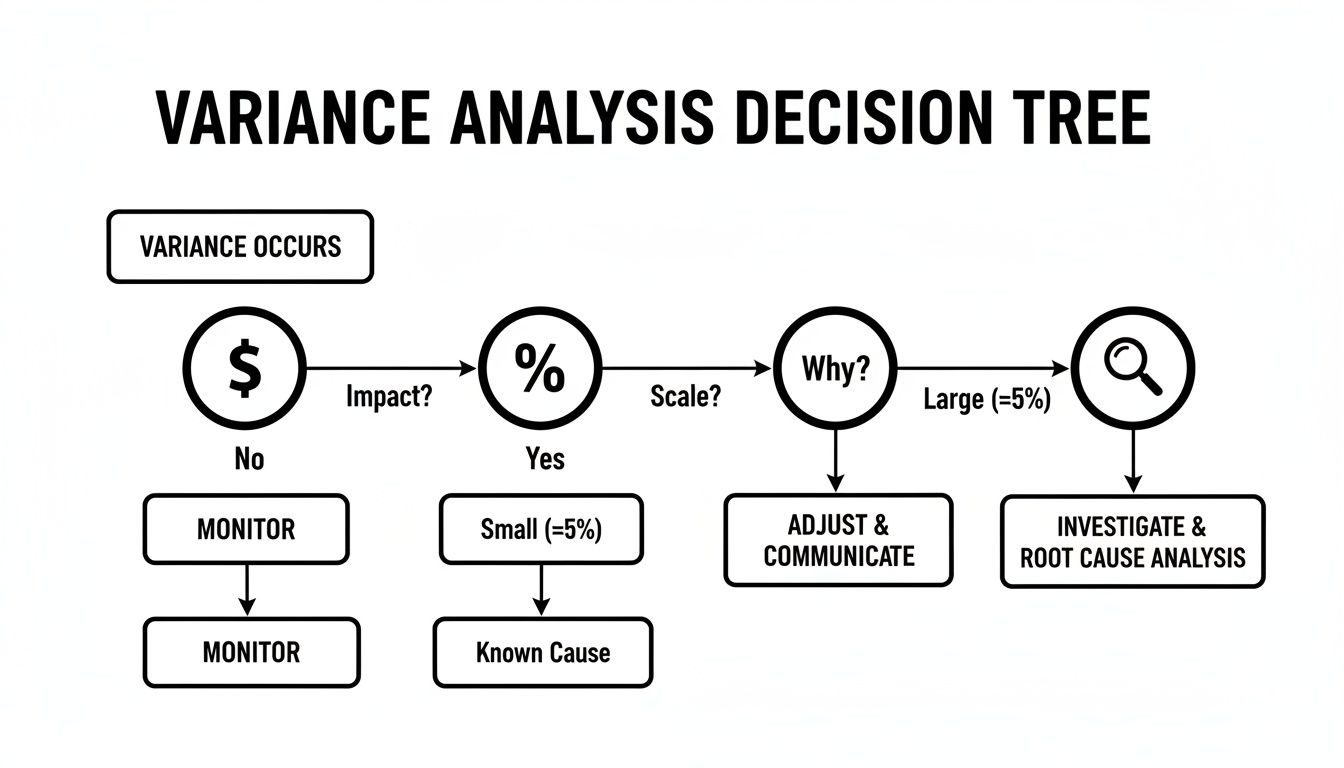
This workflow helps turn a confusing number into a clear directive, guiding you on whether to monitor the situation, investigate further, or take immediate action.
Deconstructing Your Revenue Variance
A top-line revenue variance is usually the first thing a founder looks at, but on its own, it’s a deeply unhelpful metric. Knowing you missed your sales target by $20,000 doesn’t tell you if your sales team underperformed or if your pricing strategy was off the mark.
To get any real clarity, you have to decompose the revenue variance into its two core components:
- Price Variance: Did you earn more or less per unit than you planned? This is often influenced by discounts, special promotions, or even shifts in your product mix.
- Volume Variance: Did you sell more or fewer units than you planned? This is a purer measure of your sales team's performance and the underlying market demand.
The formulas here—Price Variance = (Actual Price − Budget Price) × Actual Volume and Volume Variance = (Actual Volume − Budget Volume) × Budget Price—are what allow finance teams to assign a specific dollar impact to each driver. Think about it: on a $200 million annual revenue budget, a 5% negative price variance from heavy discounting would create a $10 million shortfall. That's a massive hit, even if your sales team hit its volume targets perfectly.
By separating price from volume, you can have a much more productive conversation. Instead of asking, "Why did we miss sales?" you can ask, "Did our new discount strategy drive enough extra volume to actually be profitable?"
Analyzing Cost of Goods Sold (COGS) Variance
For any business selling physical products, the COGS variance is critical for protecting gross margin. An unfavorable variance here means your cost to produce each item was higher than you expected, which directly eats into your profitability on every single sale.
Just like revenue, COGS variance can be broken down to find the source of the problem:
- Material Cost Variance: Did you pay more for raw materials than you budgeted for? This could be from supplier price hikes, or maybe you had to switch to a more expensive vendor in a pinch.
- Labor Efficiency Variance: Did it take your production team longer to make each unit than planned? This might point to inefficiencies on the line or gaps in training.
Pinpointing the source is everything. A material cost issue means you need to have a talk with your procurement team. A labor efficiency problem, on the other hand, needs to be addressed with the operations manager on the floor. For a deeper dive on the fundamentals, check out our complete guide on what is variance reporting.
Interpreting Operating Expense (OpEx) Variance
OpEx variances cover all the other costs of running the business—from marketing spend and software subscriptions to rent and salaries. These are often seen as more controllable "fixed" costs, which makes investigating variances here particularly important.
When a line item like "Marketing & Advertising" comes in over budget, the first question should always be whether it was a planned overspend. Maybe the marketing team spotted a high-return opportunity and made a strategic call to invest more. If so, the variance is explained, and the focus shifts to whether that investment delivered the expected return.
But if the overspend was unintentional, it signals a lack of budget discipline or poor tracking. This is exactly where automated reporting in a BI platform like Power BI becomes invaluable. It gives department heads real-time visibility into their spending against their budget, letting them manage it proactively instead of finding out after the month has already closed.
Moving from What Happened to Why It Happened
Spotting a variance is just the starting line for a proper budget vs actual variance analysis. Knowing you were $20,000 over on marketing spend is information, sure, but it’s not insight. The real value is in digging deeper to find the root cause—making the leap from knowing what happened to understanding why it happened.
This is where world-class finance and operations teams really pull away from the pack. They don’t just report the numbers; they investigate the story behind them. Doing that means you have to get out of the high-level financial statements and down into the operational drivers that actually move the needle.
Uncovering the Drivers Behind the Numbers
True causal analysis means breaking down a single variance into its component parts. Let's say you have an unfavorable revenue variance. Is that a sales problem? A pricing problem? Something else entirely? It’s impossible to know if your financial data is floating in a void, disconnected from your operational data.
Imagine finding out a negative revenue variance wasn’t because of poor sales performance. Instead, it was due to a strategic shift to a lower-margin product that your team successfully upsold. That one discovery completely changes the conversation from "Why did we miss our target?" to "Was this product mix shift actually profitable in the long run?"
You only get to that level of clarity when your financial data from your accounting system is connected with operational data from your CRM and other business systems.
Connecting Financials to Operations
A unified data model is the secret sauce for genuine driver-based analysis. As long as your sales, marketing, and operational data are stuck in separate silos from your financials, you’ll never see the full picture. You're just staring at lagging financial indicators with zero context.
But once you build an integrated data model in a BI platform like Power BI, you can start asking much more powerful questions:
- Sales Variance: How much of our revenue gap was from a drop in sales volume versus a change in the average selling price?
- COGS Variance: Did our cost of goods sold shoot up because material costs increased, or was our production team less efficient this quarter?
- Marketing Variance: We overspent on marketing, but did that extra spend generate a positive ROI by bringing in more high-value leads than we forecasted?
Answering these questions transforms your finance team from a group of historical scorekeepers into a strategic partner for the rest of the business.
When you can confidently attribute a financial outcome to a specific operational driver, you stop guessing and start making strategic bets. This is the foundation of insight-led decision-making.
The screenshot below, taken from a Power BI dashboard we built, shows exactly how you can visualize the drivers of a gross profit variance.
This visual tells a story instantly. While a favorable volume variance gave profit a nice boost, an unfavorable mix effect almost completely wiped it out, pointing directly to a shift toward lower-margin products.
Trying to do this kind of driver-based analysis consistently and accurately in a web of disconnected Excel sheets is nearly impossible. It demands a system where your budget, actuals, and operational metrics all live in the same place and speak the same language. By automating this, you free up your team to spend less time wrangling data and more time finding the insights that drive the business forward.
Want to automate your reporting and finally trust your data? Book your free BI consultation and let's build a reporting system you can finally trust.
Automating Your Variance Analysis with Power BI
It’s time to move beyond static, rearview-mirror reports. If you're still manually exporting data, wrestling with spreadsheets, and emailing outdated files, you know it's a major drag on the business. Transforming your budget vs actual variance analysis from a monthly chore into a real-time strategic tool means shifting to an automated, dynamic system like Power BI.
This isn't just about making reports look better; it's a fundamental change in how you interact with your financial data. By connecting directly to your accounting, sales, and operational systems, Power BI establishes a single source of truth. No more arguments over whose numbers are right. No more decisions based on three-week-old data. The entire process becomes reliable, repeatable, and instantly accessible.

Key Components of an Effective Power BI Dashboard
A truly effective variance analysis dashboard does more than just display numbers—it tells a story and invites investigation. It should guide you from a high-level performance summary down to the specific transactions driving a variance, all within a few clicks. As a key part of the Microsoft Power Platform, Power BI is the ideal tool for building these powerful, automated reports.
A well-designed dashboard needs several key components:
- High-Level KPI Summaries: Start with clear, at-a-glance cards showing your most critical metrics—like total revenue, net income, and gross margin—against their budgets.
- Waterfall Charts: These are perfect for visualizing how individual positive and negative variances contribute to a total. They clearly illustrate the drivers of change.
- Trend Lines Over Time: Plotting performance month-over-month or quarter-over-quarter helps you spot patterns, seasonality, and emerging issues before they become major problems.
- Interactive Drill-Down Capabilities: This is where the magic happens. It allows you to click on a high-level variance (e.g., "OpEx Overspend") and instantly filter the entire report to see which departments, expense categories, or even specific vendors contributed.
When you automate data integration and visualization, your team can finally trust the numbers. This is the point where you stop fighting with data and start using it to make critical business decisions. Your reporting becomes a genuine competitive advantage.
From Static Numbers to Dynamic Investigation
The real power of an automated dashboard is its ability to facilitate fluid, interactive analysis. Imagine seeing an unfavorable revenue variance on your main summary. In a traditional Excel report, your next step would be to fire off an email to the sales manager and wait for an explanation.
With Power BI, your workflow is completely different.
Here’s an example of a report designed for this exact purpose, allowing you to slice data on the fly.
This dashboard lets you seamlessly investigate a variance by filtering by business unit, country, or product, providing immediate context that static reports could never offer.
This interactivity transforms your variance review from a passive report-reading exercise into an active investigation. You can formulate a hypothesis, test it against the data, and get to a root cause in minutes, not days. This capability is built on a solid data structure; you can explore the principles behind this in our guide explaining what dimensional modeling is. It’s this structure that lets you connect the dots between finance and operations effortlessly.
If you’re ready to graduate from frustrating spreadsheets and empower your team with dynamic, trustworthy insights, we can help. Connect with us to design your financial dashboard in Power BI and turn your data into your most valuable asset.
Time to Take Control of Your Financial Story
Moving from the chaos of manual Excel reporting to the clarity of an automated BI system is more than just a tech upgrade—it's a fundamental shift in how you run your business. When you get a real handle on budget vs actual variance analysis, you stop reacting to last month’s numbers and start proactively shaping your company's future. It’s how you make confident, data-backed decisions that get your entire team pulling in the same direction.
This isn't just about tweaking forecasts. It's about truly understanding what drives growth and freeing up your most valuable resource—your time—to scale the business instead of wrestling with spreadsheets. You're building a system that finally connects the dots between your financial statements and your day-to-day operations, giving you a complete, trustworthy picture of your company's health.
Stop Guessing, Start Knowing
If you're ready to trade guesswork for certainty, you need a better system. The endless cycle of manual data pulling doesn't just drain resources; it keeps you from focusing on what actually moves the needle. By putting a more robust process in place, you can turn your financial data from a chore into a strategic asset.
Looking into solutions for automated financial reporting software is the first real step toward building a more resilient and insightful finance function. This isn't just about getting reports out faster. It's about gaining the confidence to make bold moves because they're backed by solid evidence. Your financial story is far too important to be left to chance.
The ultimate goal of variance analysis isn't just to report on the past; it's to provide the clarity needed to command the future. It transforms your financial data from a historical record into a strategic roadmap for growth.
Imagine having a dynamic financial dashboard right at your fingertips, one that gives you clear answers and lets you drill down into the "why" behind every single number. This kind of power is no longer a luxury reserved for massive enterprises.
Ready to build a reporting system that finally works for you, not against you?
Book a free discovery call with a Vizule BI consultant today and see how quickly you can get a dynamic financial dashboard that connects all the dots in your data.
Frequently Asked Questions About Variance Analysis
When you start digging into a proper budget vs actual variance analysis process, a few common questions always pop up. Business owners and founders we work with tend to hit the same roadblocks, so getting clear, practical answers is the first step toward gaining real control over your financial reporting. Let's tackle the big ones.
How Often Should We Perform Budget vs Actual Analysis?
For almost every business, a monthly review cadence is the sweet spot. This frequency is just right—it's regular enough to spot meaningful trends and make corrections before small issues snowball, but not so often that you're just reacting to daily noise.
If you wait until the end of the quarter, you're looking in the rearview mirror. By then, the opportunity to make a timely adjustment is long gone, and the analysis becomes a historical report card instead of a forward-looking management tool.
What Counts as a Significant Variance Worth Investigating?
There’s no single magic number here, but a great rule of thumb is the "5% and $5,000" rule. This means any variance that is both greater than 5% of the budgeted amount and over a meaningful dollar threshold (like $5,000) automatically gets flagged for a closer look.
This dual-trigger approach is all about context. A 50% variance on a $100 software subscription is irrelevant noise. But a 2% variance on a $1 million payroll budget? That’s a major cash event that demands an explanation. The key is to set thresholds that make sense for your business’s scale and risk appetite.
A significant variance isn't just a number—it's a story waiting to be understood. The goal isn't to explain every dollar, but to uncover the operational drivers behind the deviations that truly matter to your bottom line.
How Long Does It Take to Automate Variance Reporting in Power BI?
The timeline to automate your variance analysis in a tool like Power BI hinges entirely on how clean and accessible your source data is. But for a typical small or medium-sized business with its financials in a modern accounting system like Xero or QuickBooks, we can get a foundational dashboard up and running within 30 days.
That initial build involves hooking up the data sources, creating a solid data model, and designing the core visuals. From that point, you can layer on more sophisticated views, like driver-based decompositions. It's important to know what you're building towards, as we break down in our guide comparing actuals vs forecast methodologies. That upfront investment pays for itself almost immediately by saving you hours of tedious manual spreadsheet work every single month.
Ready to stop asking questions and start getting answers from your data? The team at Vizule specialises in building dynamic, automated financial dashboards that give you the clarity you need to scale with confidence. Book your free BI consultation and see how we can transform your reporting in weeks, not months.
