


For founders and SMB operators, the daily scavenger hunt for information is a familiar—and frustrating—grind. You know the feeling: searching through old emails for a proposal template, hunting down the latest sales numbers in a random spreadsheet, or trying to remember a critical process locked inside a key employee’s head. A Knowledge Management System (KMS) cuts through that chaos. It’s a central hub for capturing, organizing, and sharing your company’s collective intelligence, moving you from scattered files to a single source of truth.
Think of it as your business’s central nervous system. It connects every piece of critical information, making sure your sales team is working from the same playbook as your operations team, and your financial reports are built on data you can actually trust.
Escaping the Data Maze with a KMS

Does your business run on a patchwork of disconnected Excel files, siloed team drives, and crucial operational details known only to one person? If so, you’re not alone. But this data disorganization isn’t just inefficient; it’s a direct obstacle to growth.
Every hour someone spends digging for a sales script or the latest financial model is an hour not spent serving clients or scaling the business. This is the exact pain point that Knowledge Management Systems are built to solve.
Imagine a meticulously organized digital library where anyone on your team can instantly find the exact “book” they need—whether it’s a client onboarding checklist or a cash flow reporting template. That’s what a KMS delivers. It transforms the messy, digital attic of company know-how into an accessible, searchable, and reliable asset.
The True Cost of Disorganized Knowledge
Without a central system, your business bleeds efficiency in ways you might not even realize. Information becomes “tribal knowledge,” known only to a select few. When a key employee leaves, their expertise walks out the door with them.
This constant reinvention of the wheel slows down everything from training new hires to delivering consistent customer service. A KMS tackles this head-on by giving you a structured framework to:
- Centralize critical documents like process guides, sales playbooks, and financial templates.
- Streamline employee onboarding by giving new hires a single place to find company procedures.
- Improve decision-making by ensuring everyone works from the same up-to-date information.
- Drive consistency in customer service and operational execution.
This is a familiar struggle for many small and mid-sized businesses. The day-to-day reality of scattered information creates bottlenecks that directly impact the bottom line. Here’s a quick look at how a KMS flips the script on those common frustrations.
From Data Chaos to Business Clarity
| Common SMB Pain Point | How a KMS Solves It |
|---|---|
| “Where’s that file?” Syndrome: Key documents are lost in emails, personal drives, or outdated folders. | Provides a single, searchable repository for all critical assets, ending the scavenger hunt. |
| Employee Onboarding Takes Forever: New hires constantly ask the same questions, draining senior team members’ time. | Creates a self-service learning hub with all necessary training materials and process guides. |
| Inconsistent Customer Experience: Different team members give customers conflicting information or follow different procedures. | Standardizes playbooks, scripts, and FAQs to ensure every customer interaction is consistent and professional. |
| Losing Knowledge When People Leave: An employee’s departure creates a huge knowledge gap that takes months to fill. | Captures and documents institutional knowledge, making it a company asset that isn’t dependent on any single person. |
| Slow Decision-Making: Teams can’t act quickly because they can’t find the data they need to make an informed choice. | Surfaces relevant, up-to-date information quickly, empowering teams to make faster, data-driven decisions. |
By turning these everyday pain points into strategic advantages, a KMS doesn’t just organize your files—it builds a more resilient, efficient, and scalable business.
For founders and operators, a KMS isn’t just about better organization. It’s about building a scalable foundation where knowledge becomes a shared asset that fuels growth, rather than a bottleneck that slows it down.
The adoption of these systems is picking up speed, especially as more teams go remote. The global market for knowledge management systems was valued at USD 7.88 billion in 2024 and is projected to hit USD 20.46 billion by 2032, all driven by the simple need for seamless information access.
You can find more insights on this growing market over at Verified Market Research. The trend points to one clear conclusion: modern, successful businesses run on accessible, well-managed knowledge.
The Four Pillars of an Effective KMS
A powerful Knowledge Management System isn’t just a digital filing cabinet. Think of it more like a living, breathing ecosystem for your company’s most valuable asset: its collective know-how. For non-technical founders and operators, it helps to break a KMS down into four simple, functional pillars that work together to turn scattered information into a real strategic advantage.
These pillars completely change how your business operates. They make sure every piece of crucial intelligence—from a winning sales script to a complex financial model—is captured, organized, shared, and ultimately, used to drive better results.
Let’s break down each one with real-world scenarios that SMBs face every day.
Knowledge Capture: Getting Information In
The first pillar is Knowledge Capture. This is all about getting critical information out of your team’s heads, inboxes, and random spreadsheets and into one central system. Just think about all the “tribal knowledge” that exists in your business—the unwritten rules and expert shortcuts that only a few key people know.
If your top salesperson has a unique method for handling objections, that’s valuable knowledge. If your operations lead has perfected the client onboarding process, that’s an asset. Knowledge capture makes sure this expertise doesn’t just walk out the door when an employee leaves.
- Real-World Scenario: A startup founder notices her two best customer support agents resolve complex issues twice as fast as new hires. She uses the KMS to document their step-by-step troubleshooting process, including templates for customer responses. This captured knowledge now serves as a training module, cutting the ramp-up time for the entire support team.
Knowledge Organization: Making Information Findable
Once the knowledge is in the system, the next pillar is Knowledge Organization. This is about creating a smart, intuitive structure so people can find what they need, right when they need it. Without proper organization, your KMS can quickly become just as chaotic as the shared drive it was supposed to replace.
This means using tags, categories, and clear hierarchies to structure content logically. A well-organized system means an employee can find the “Q3 marketing budget” in seconds, not minutes (or hours). This pillar is foundational to building a system people actually trust and use. It also plays a key role in good governance, ensuring data is managed correctly. You can dive deeper by exploring our guide on data governance best practices.
This is a great visual for how a KMS works. It builds on a central repository but gets its power from search and collaboration features.
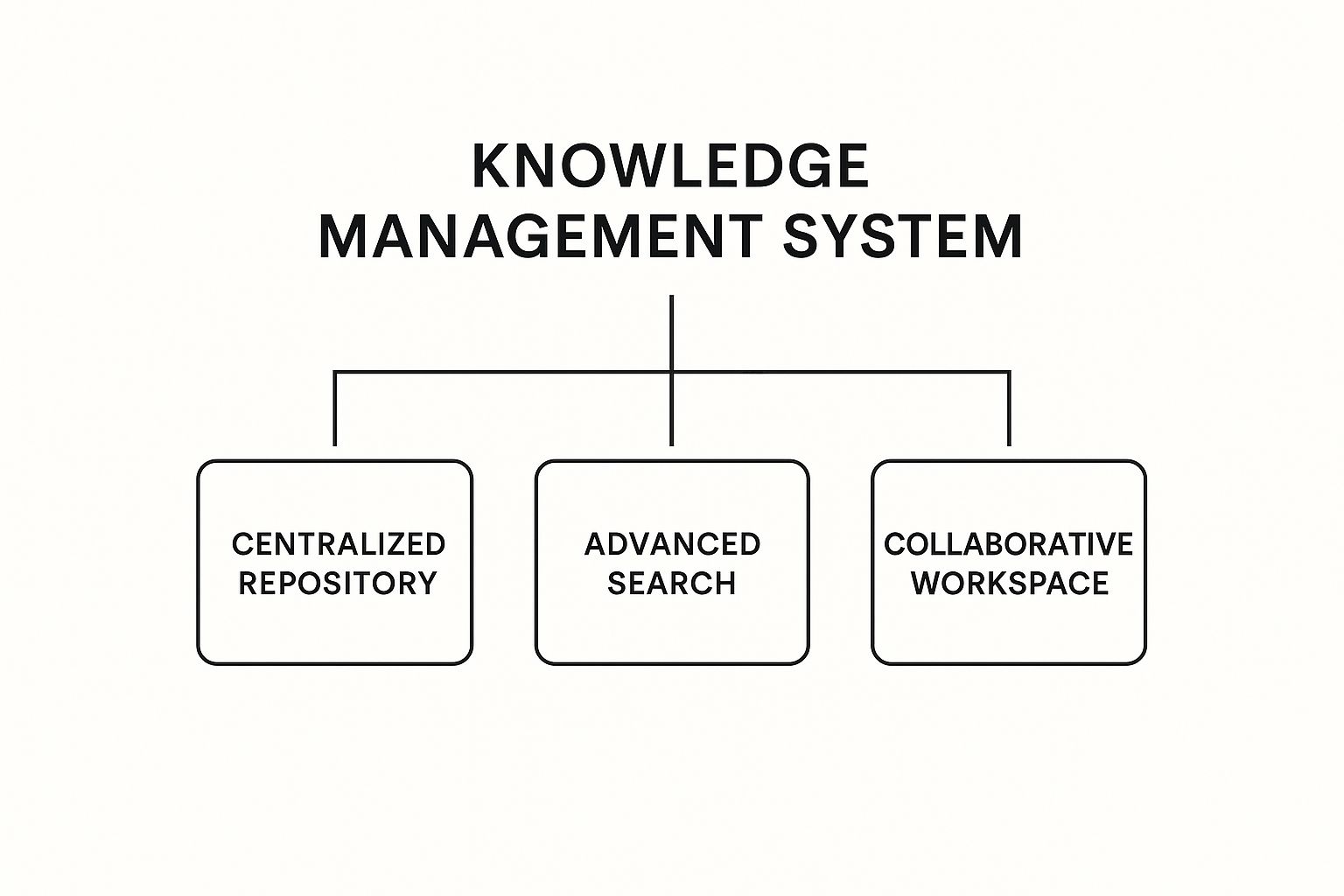
As you can see, the central database is the core, but its true power comes from making that information searchable and collaborative for the whole team.
Knowledge Sharing: Getting Information Out
The third pillar, Knowledge Sharing, is where the system really comes alive. It’s all about making that organized information accessible and encouraging collaboration across your team. It’s not enough to just store information; you have to create a culture where sharing is effortless and encouraged.
Modern systems do this with features like discussion forums, comment sections on documents, and integrations with tools everyone already uses, like Slack or Microsoft Teams. This pillar is what breaks down those frustrating information silos and makes sure everyone is working from the same playbook.
A KMS succeeds when it becomes the go-to place for answers. It shifts the team’s default behavior from asking a colleague and waiting for a response to finding the answer themselves instantly.
Knowledge Application: Using Information to Improve
Finally, we get to the most important pillar: Knowledge Application. This is the ultimate goal. Your team uses the centralized knowledge to make better decisions, run processes more consistently, and solve problems faster.
But it doesn’t stop there. Knowledge application also creates a powerful feedback loop. After using a documented process to close a deal or solve a customer issue, an employee might discover a better way to do it. They can then update the KMS with this new insight, refining the collective knowledge for everyone else.
This continuous cycle of application and improvement is what turns a static knowledge base into a dynamic engine for growth and operational excellence.
Connecting Your KMS to Business Intelligence
A Knowledge Management System is a powerhouse for organizing your company’s collective wisdom, but its real potential is unlocked when it fuels your Business Intelligence (BI). Storing information is one thing; using it to drive strategy is another. This is where the magic happens for founders and operators looking to escape Excel chaos and scale intelligently.
Think of your KMS as the single, meticulously organized source of truth for your company’s most critical operational and sales processes. It’s the home for your best practices, sales playbooks, and standard operating procedures (SOPs). Now, imagine plugging a tool like Power BI directly into that source.
Suddenly, your KMS goes from being a passive library to an active engine for insight. You’re no longer just storing knowledge—you’re measuring its impact.

From a Library to a Live Dashboard
Without a connection to BI, your KMS helps answer questions like, “What is our process for handling customer complaints?” Useful, but limited. With a BI connection, it starts answering much more powerful questions. Questions like, “Which steps in our documented customer complaint process are taking the longest to resolve?” or “Is our top-performing sales team actually following the playbook in the KMS?”
This link-up provides the clean, reliable, and contextualized data that tools like Power BI thrive on. The KMS provides the “what” and the “how” (the documented processes), while your operational data shows “what happened.” Power BI bridges that gap, visualizing performance against the established standard.
For instance, you can build dynamic financial and operational dashboards that track key metrics such as:
- Team Performance vs. Best Practices: See how different teams or individuals stack up against your documented gold-standard processes.
- Customer Issue Resolution Times: Pinpoint bottlenecks in your support workflows by tracking tickets against the steps laid out in your KMS.
- Sales Cycle Velocity: Analyze how adherence to your sales playbook impacts the time it takes to close a deal.
This shifts your team from reactive problem-solving (“Why are we getting so many complaints about shipping?”) to proactive, data-informed decision-making (“Our Power BI dashboard shows Step 3 of the shipping process is causing a 48-hour delay; let’s fix it.”).
The Power of a Single Source of Truth
The core benefit here is creating a true single source of truth. It’s a term that gets thrown around a lot, but this is what it actually looks like in practice for an SMB.
When your operational reporting is tied directly to your documented processes, you eliminate the ambiguity and “Excel chaos” that plagues so many growing businesses. There’s no more debating which version of a process is the “right” one, because the standard is documented in the KMS and the performance is visualized right there in your Power BI dashboard.
This integrated approach is fundamental to building a scalable operation. It ensures that as you grow, your processes don’t just exist on paper—they are actively measured, managed, and improved based on real-world data. This is a core part of the work we do at Vizule, building that critical connection between your systems and your strategy to automate financial and business reporting.
A KMS tells you how your business should run. Business Intelligence tells you how it is running. Connecting them tells you why there’s a difference and what to do about it.
Unlocking Operational Efficiency
This connection between knowledge and data is a primary driver of efficiency. It’s not just a theory. Recent studies show that operational efficiency is a key goal for knowledge workers, with 44% prioritizing process enhancement through better knowledge management. Mature systems lead to faster problem-solving, reduced training costs, and better customer service precisely because they make critical information accessible and actionable. You can review the full analysis of KM trends to dig deeper.
Ultimately, integrating your KMS with BI is about turning knowledge into performance. It provides the clarity and insight needed to refine your operations, coach your team, and make strategic decisions with confidence. This is how you build a business that not only runs on data but learns from it.
If you’re ready to transform your scattered data into a clear performance dashboard, Vizule can help. Our expertise in business intelligence and analytics ensures your systems are connected and your data tells a clear, actionable story.
Want to see how your operational knowledge can fuel powerful reporting? Book a free BI consultation with our consultants today and let’s design your insight engine.
Choosing the Right KMS for Your Business
Trying to pick a knowledge management system can feel like you’re lost in a sea of software. Every option promises to solve all your problems, and it’s easy to get bogged down in technical jargon and endless feature lists.
As a trusted advisor, we tell our clients to ignore the noise. Step back from the software itself and ask one simple, strategic question: What is our primary business pain point?
Instead of just making a list of tools, let’s build a decision-making framework around what you actually need to accomplish. Are you trying to slash the time it takes to onboard a new hire? Or is your main problem getting your customer support team the answers they need to resolve issues faster? The right KMS is the one that directly attacks your most pressing business objective.
It’s no surprise the market for these tools is booming. Valued at USD 20.15 billion in 2024, the knowledge management software market is expected to rocket to USD 62.15 billion by 2033. The overwhelming move toward cloud-based systems shows a massive shift towards flexibility and scalability—a perfect match for growing businesses. You can explore more insights into the knowledge management market to see just how this trend is shaping modern operations.
Understanding the Main Categories of KMS
To make your choice easier, we can group most KMS platforms into a few distinct buckets. Each one is built to solve a different kind of problem.
- Internal Wikis and Collaboration Hubs: These are your company’s private Wikipedia. They’re perfect for documenting internal processes, creating standard operating procedures (SOPs), and keeping company policies in one place.
- Customer-Facing Knowledge Bases: These platforms are all about self-service support for your customers. They house your FAQs, troubleshooting guides, and product tutorials so people can find their own answers.
- Examples: Zendesk Guide, Help Scout, Document360
- Best for: Slashing the number of support tickets, improving first-contact resolution, and empowering your customers.
- Integrated Document Management Systems: Think of these as the heavy-duty option. They’re more robust systems focused on the entire lifecycle of a document, offering features like version control, advanced security, and deep integrations with other business tools.
- Examples: SharePoint, Google Workspace
- Best for: Businesses in regulated industries or anyone needing tight control over sensitive documents and complex project files.
KMS Feature Comparison for SMBs
For most founders, the right choice boils down to balancing functionality with budget and future needs—especially when it comes to integrating with BI tools for deeper analysis. This table breaks down the options to help you find the best fit.
| KMS Type | Best For | Typical Cost | BI Integration Potential |
|---|---|---|---|
| Internal Wiki | Documenting processes, onboarding, and internal collaboration. | Low to Moderate (often per-user, per-month) | Moderate. Can connect to BI tools like Power BI to track content usage, but not typically a direct data source for operational metrics. |
| Customer-Facing KB | Customer self-service, reducing support tickets, and creating FAQs. | Moderate to High (often tied to a larger customer service suite) | High. Excellent for connecting to Power BI to analyze ticket deflection rates, search queries, and article effectiveness. |
| Integrated DMS | Secure document storage, version control, and compliance. | Moderate to High (part of a larger ecosystem like Microsoft 35) | High. Can serve as a structured data source for BI tools, allowing analysis of document workflows and project data. |
Looking at the table, it’s clear that your primary goal—whether it’s internal efficiency or external support—heavily influences not just the cost, but also how much analytical power you can get out of the system down the line.
Asking the Right Questions Before You Buy
Before you book a single demo, run through this quick self-assessment. Your answers will point you directly to the category of KMS that makes the most sense for your business.
- Primary Goal: Is my main objective to improve internal efficiency or external customer support?
- Key Users: Who will be using this system the most—my employees or my customers?
- Biggest Pain Point: Are we struggling more with disorganized internal processes or with an overwhelming volume of customer questions?
- BI & Analytics: Do I need to connect this system to Power BI to track performance metrics, or is it purely for information storage?
- Budget & Scale: What is a realistic monthly budget, and will this tool grow with us over the next two years?
Choosing a KMS isn’t a technology decision; it’s a business strategy decision. By focusing on your core operational goals first, you ensure the tool you select becomes a true asset that drives growth, rather than just another software subscription.
This consultative approach is exactly how we operate at Vizule. We help founders align their technology choices with their business strategy to make sure every investment delivers a real, measurable return.
Ready to connect your business systems to a powerful BI reporting stack? Book your free BI consultation and see how Vizule can help automate your reporting and unlock clearer insights.
Your Roadmap for a Successful KMS Launch
Picking the right software is just the first step. Let’s be honest, the best knowledge management system in the world is completely useless if your team doesn’t actually use it. For busy founders and operators, the idea of rolling out yet another new tool can feel like a heavy lift.
But a successful launch doesn’t need a complex, enterprise-level plan. It’s all about being strategic, grabbing some quick, tangible wins, and showing your team how the KMS makes their jobs easier, not harder. This roadmap breaks it down into simple, manageable phases perfect for an SMB, helping you build real momentum and get everyone on board from day one.
Start with a Single, Focused Goal
Instead of trying to document your entire company all at once—a surefire way to get overwhelmed—pick one high-impact, low-complexity area to tackle first. This approach creates an immediate win that proves the system’s value and builds enthusiasm for using it more widely.
The goal here is to solve a real, tangible pain point, and to do it quickly. Success in one small area makes it infinitely easier to get your team excited about what’s next.
Your first project could be something like:
- Documenting the entire client onboarding process: Map everything out from the signed contract to the project kickoff call. Now you have a single source of truth that anyone can follow.
- Centralizing all sales and marketing materials: Make sure everyone is using the most up-to-date pitch decks, case studies, and proposals. No more “is this the latest version?” emails.
- Building a “survival guide” for new hires: Pull together all the essential info a new team member needs for their first 30 days.
Appoint a Project Champion
Every successful new project needs a champion. This is the person who owns the process, is genuinely passionate about the outcome, and can be the go-to resource for the rest of the team. In a small business, this could easily be an operations manager, a senior team lead, or even you.
This person will spearhead gathering the initial content, encourage others to contribute, and generally keep the project on track. Their energy and commitment are what will push the team through that initial friction that comes with any new system.
Gather and Organize Critical Information First
Once you’ve got your champion and your first goal, it’s time to start filling the system. Begin by collecting the most critical pieces of information. Don’t aim for perfection right away; just focus on getting the core, high-value knowledge loaded into the KMS.
A big part of this involves knowing the best practices for building an AI knowledge base, which can dramatically change how you organize and find information. Modern systems use smart tagging and categorization to make content incredibly easy to find, which is essential for making the tool feel useful from the get-go.
Train Your Team by Highlighting the “Why”
Training should never be a dry walkthrough of software features. It needs to be laser-focused on answering one simple question for every single person on your team: “What’s in it for me?”
Frame the training around how the KMS solves their specific, daily frustrations.
- For the Sales Team: “No more hunting through five different folders for the latest case study; it’s always right here.”
- For the Operations Team: “The entire client onboarding checklist is standardized, so critical steps never get missed again.”
- For New Hires: “Everything you could possibly need to know for your first month is in one place.”
When your team sees the system as a tool that saves them time and kills headaches, adoption stops being a chore and becomes a no-brainer. This process often means pulling data from various sources, a challenge Vizule helps clients solve. You can learn more about our approach to streamlining your data integration consulting to create that single source of truth.
Establish a Simple Maintenance Routine
Finally, remember that a knowledge base is a living thing. To keep it valuable, it needs to stay current. Set up a simple, manageable routine for reviewing and updating content. It doesn’t have to be complicated. Just assign ownership of certain documents to specific team members and set quarterly reminders to have them review key articles.
By following these practical steps, you can turn your KMS implementation from a dreaded project into a strategic win that boosts efficiency and truly empowers your team.
Turn Your Knowledge Into Your Greatest Asset
We’ve just walked through the entire journey, from scattered data to strategic clarity. But a Knowledge Management System is so much more than just another piece of software—it’s a foundational investment in your company’s ability to scale, adapt, and make smarter decisions. Think of it as the engine that powers everything else.
By centralizing your processes, best practices, and collective expertise, a KMS gets rid of the daily chaos of hunting for information. It becomes the reliable, single source of truth that fuels your entire business intelligence stack, including those powerful reporting dashboards in Power BI. This shift turns your operational data from a simple record into a genuine strategic asset.
It’s time to stop letting valuable company knowledge walk out the door every evening or get buried in siloed spreadsheets. If you want to dive deeper into how artificial intelligence is taking this even further, you can read about AI for Knowledge Management: Unlock Organizational Insights.
A well-implemented KMS doesn’t just organize information; it creates a culture of continuous improvement, where insights are shared, measured, and used to drive real growth.
Ready to build an insight-led organization and turn your institutional knowledge into a measurable competitive advantage? It all starts by connecting your systems to a clear reporting strategy.
See how Vizule can help automate your reporting stack. Book your free BI consultation with an expert today to finally connect the dots in your data.
Answering Your KMS Questions
When you start seriously thinking about a knowledge management system, the practical questions always bubble to the surface. Let’s move past the theory and get into the real-world concerns we hear most often from founders and operators ready to get their business intelligence organized.
How Much Does a KMS Actually Cost?
The price tag on a knowledge management system can swing pretty wildly, but most operate on a per-user, per-month subscription. This model is great because it scales right alongside your business.
Here’s a rough breakdown:
- Internal Wikis (think Notion or Confluence): These are usually your most budget-friendly options, starting around $10-$20 per user each month. They’re perfect for building out a central company playbook and mapping out your internal processes.
- Customer-Facing Platforms (like Zendesk Guide): These are typically bundled into a bigger customer service suite. Expect to pay anywhere from $50 to over $150 per agent per month, depending on how advanced you want to get.
- Integrated Systems (like SharePoint): The cost here is often just part of a larger subscription like Microsoft 365. If you’re already in that ecosystem, it’s an incredibly cost-effective way to go.
How Long Is This Going to Take to Set Up?
Honestly, implementation time all comes down to where you’re starting from.
If you have a very specific goal—say, finally documenting your entire sales process—a small team can get a basic KMS off the ground in just a few weeks. But if you’re talking about a more complex rollout that involves migrating a ton of data and hooking it into tools like Power BI, you’re probably looking at a one to three-month project.
The real secret is to start small. Don’t try to boil the ocean. Pick one part of the business that’s causing a lot of pain, document it, and build momentum from there. This gives you a quick win and proves the system’s value to the rest of the team.
How Do I Get My Team to Actually Use It?
Getting people to adopt a new tool is always the biggest hurdle, but it’s totally surmountable if you approach it the right way. This isn’t about forcing another piece of software on your team; it’s about making their day-to-day work less frustrating.
- Find Your Champion: Pick one person who’s genuinely excited about the project and put them in charge of leading the effort.
- Focus on “What’s In It For Me?”: Every bit of training should answer this question for each person. For a salesperson, it means no more digging through old folders for the latest case study. For your operations lead, it’s a standardized checklist for every new client.
- Put It Where They Work: The best way to ensure adoption is to integrate the KMS with the tools they already live in, like Slack or Microsoft Teams. If the knowledge is right there in their workflow, they’ll use it.
- Lead From the Top: As a founder or manager, make the KMS your go-to. When people ask you questions, point them to the answer in the system. Your actions will set the tone for everyone else.
By focusing on these clear, practical benefits, you can transform your KMS from just another subscription into the central nervous system of your entire business.
At Vizule, we help founders and operators build the systems that turn scattered data into a clear competitive advantage.
Want to automate your reporting and finally trust your data? Book a free discovery call with our BI consultants today.


